All posts by Joe

Proxmox setup and uses

Proxmox setup and uses

Well i was asked to write this innards up because i have talked about it alot in the last year or so and i am happy to do it. I also needed to do some research to make sure that my data was correct and i am told that i need to start practicing with AI more so i did use it to bring a lot of this data together. I did verify as much as i could and i am dont mind being corrected if anyone finds it necessary.

First what is proxmox
Proxmox is a free and open source server management platform that allows for full virtualization as well as lighterweight contanierization using a web based interface that interconnect with other proxmox ‘nodes’ and is a bare metal hypervisor that sits on top of a full debian distrobution.

Couple of things that need to be explained in that definition. You can run fully virtualized operating systems that have their own kernels and are fully isolated from everything else. The interface allows you to dedicate the amount of ram, disk space and the amount of processor to use. As well as many other things like the architecture of the processor to be emulated, the type of disk to emulate such as ssd scsi and a few other things. You can also control what gets passed to the VM in a several different ways. You can pass PCI devices to the VM with PCI passthrough which is already setup and working at install time(with exceptions). You can pass a mapped usb device or a usb port or an unmapped device depending on the need.
You can also pass full disks to a vm if you want or you can create directories from the node and just pass the directory. Or create virtual ethernet bridges that can be attached to physical ethernet ports and then force VM’s or containers to use that for their internet. Another usefull thing you can do when resources are somewhat limited is over allocate the entirety of the resources available and then set everything to ballooning so that different operations can grab the needed resources as they become available. Or limit the amount of resources that different operations can use if it is a lower priority.

Next up is containers. In this case they are LXC’s which are lightweight containers that share the host systems kernel instead of having one of their own making them fast and efficient for running specific services. They have taken the place of a lot of my previous Docker build outs but we can get back to that. While it is a bit more difficult in some cases you can still pass everything to these that you can to a VM depending on whether or not the container is privileged or unprivileged. The main difference being that privileged containers allow for root access and unprived do not. it can be a large hassle to get disks or services passed back and forth to an unprived container but they are much safer to use.

Something that should be mentioned is that after initial setup proxmox is normally headless. It is controlled and viewed from a web interface. During the VM and LXC setup process, proxmox will handle the IP configuration and ports. You can tweak it if you want to, i know some people like the ip address to match the id number of the VM or container which does make identification easier. Also you can access the command line for the LXC’s but they are normally seen from whatever ip the service uses. VM’s are usually viewed through novnc so you can interact with them directly from the proxmox interface.

Why use proxmox
Why would you use something like this? I mean these are all things you could do yourself directly on any debian based installation right? Well yeah i mean you could if you wanted to go through the process of setting it all up. This is all in one place and ready to go with good documentation on how to do things. The interface alone makes the process worth it in my opinion. most of the shortcomings that i can find i have been able to work through or around as needed and redeployment in the case of catastrophic failure has been pretty easy so far.
I dont usually advocate for running someone elses scripts but proxmox helper scripts is probably the only thing that has made this even remotely useable for me. Just about all of the things that you want to run are findable there. LXC’s and VM’s both. I have done a walkthrough or two building my own LXC when there was not one on the helper scripts page but all in all it is as simple as copy, paste and follow the prompts to get things setup the way that you want. This being community run they are reviewed by others and with how proxmox is setup if one of them is causing a problem it is just a couple of clicks to nuke it.
The proxmox web interface is also a great tool for seeing how much hardware is in use. You can go to the node page and see if ram is maxed out and then go to each individual service one at a time to see which one is using what. Dont need a service anymore? You can shut it down and remove it in a few clicks

How to setup proxmox
Setting up proxmox is not the easiest thing to do correctly but i wouldnt exactly call it difficult. There are some quality of life things to keep in mind that i will mention though
Proxmox will run on just about anything, i have even seen people talk about running it on a raspberry pi so i wouldnt worry too much just grab what you have and put it to work. Grab the image from the internet and you will need to use etcher or DD or rufus in dd mode to create the usb disk. You cannot use ventoy. Next thing to remember is to have it connected to the network that you are going to use for it. WIRED network not wireless. There are some workarounds i think to make it work that way but that is something to setup later. You can get everything setup without the network connection but it is much harder to do and impossible to control until you get it working correctly. Write down the IP address. You can get it from your router but you might as well grab it now
Once the initial install is complete you can disconnect the keyboard and monitor if you want or we can put it back to use in a short time. All the rest of the setup is done from the web interface. So you bring it up from the IP that you wrote down at port 8096.
The next thing to do is go to the node since it is the only thing there and then bring up the shell for it. It is a button in the top right corner. The first thing that i always do is get the post install helper script from the proxmox ve helper script site https://community-scripts.org https://community-scripts.org/scripts/post-pve-install just copy and paste. This will update the repos including disabling the enterprise repos and will also get rid of the subscription nag. This is important to do so that you can partially automate updates.
The next thing to do is if you have another node then you need to add this to the cluster using ‘pvecm add IP’ and then do your usual update upgrade autoremove just to verify. It probably should have happened automatically but until the repos are corrected there could be an issue.
After that if you have more than one drive you need to map a directory to that drive which can then be used for VM’s and LXC’s if your primary drive is smaller or if you want a vm that uses a lot space. You can also use it to hold isos or share a portion of that drive as a mount to a VM or LXC.
Next thing to do is go out and get your iso images. The interface makes this very easy. There is a drive marked out as ‘local’ which you can go to and click on ISO images and either upload from local or you can download from URL which is basically a get command. That will make it so that you dont have to DL it locally first which can be useful. These will be the ones you are using when you do an initial install of a VM. I mean i usually at least make sure that i have the most recent image of mint. LXC’s the easiest way to get them is from the website that i posted and then to paste that into the shell for the node.
Each of these image instances has its own summary page with a notes section. I usually delete everything that is in there and put in the IP address and port in there along with any install options or set up that had to be done. the link is very useful if you can write a little html. This should not change as the container will always try to get the same IP adress. You can make it more certain by making a static ip on the router side. In most of the containers the IP is also included in summary section underneath the resources but sometimes this is not able to populate.
Next a suggestion: if you have a container or a vm that is difficult to setup or has a convoluted internal setup then i would suggest cloning it and migrating the clone. As long as you are not trying to run both at the same time you will get the same ip address even if it is move to and running on a different node in the cluster. Having the backup will save you a lot of headache later. But you probably dont need to do it for every image if they are pretty easy to replace. There are other ways to do this with things like high availability but that requires some redundancy of resources and something like proxmox backup server which requires a dedicated machine.
You can also include samba shares and nfs in the datacenter portion which will make that share available to all of the nodes in a cluster. This is great for vms but with LXC’s if you have one that is unprivileged it is very difficult to get it to be able to write to the share through the datacenter. But if you mount using a normal samba command then it is possible without doing a lot of work with users and permissioning that i was never able to get to work correctly

what i use it for and how does it help
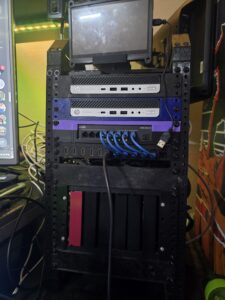
I use my mini rack for a lot of things really. Any server service that i have set up goes there. samba, pihole, wireguard, openvpn, jellyfin, immich, audiobookshelf and a few others. I used to do this with an LXC of docker and using portainer and docker compose. That worked but the layers of permissioning got annoying and then there were issues with automated backups and if something happened that required me to get rid of the LXC then i would lose everything that in docker instead of the individual service that was the problem. A few times to get around the permissiong problems i would install a vm and then put services on that but then there was the problem that if i needed to nuke the VM then i would lose those services too plus if i had to restart the VM then everything would go down. So i do still use VM’s but for things that need a direct gui or to be able to run linux from my android phone. I also use then in conjunction with openvpn connected to my pia vpn. This means that multiple things can use a single vpn access since pia limits you to 5 connections.
I use two instances of openvpn connected to pia on two seperate machines. One of those machines i have connected to an external monitor so that i can always have a machine that is on a vpn incase i have something that requires it. This is accomplished by passing the graphics portion of the APU to the VM with pci passthrough.
The other one i use on a different machine without pci passthrough so that i can still access it using the no-vnc from a webpage which allows me to use it from my phone. On that machine i am using jellyfin which has the apu passed to it for transcoding purposes. I am using it but i need to dig further into the logs to see how it is working and make sure that it is doing everything that i want it to. jellyfin used to be setup inside a VM but that was causing me some problems when i would restart other machines and the samba shares would come unmounted. I also lost the vm when i had to do some formatting and it was too large to backup elsewhere.
I also have joplin set up there which is one of the things that i used to have setup in docker in an lxc. Joplin is a fairly simple markdown editor with some fancy setup for notes organization and server that you can install yourself so that everything is self hosted and while not real time updating on all of your devices it is pretty quick and allows me to switch between for near seamless work. I use it for basically everything that i need to write down. I am by no means an expert on markdown but i am getting the hang of it and there are plenty of cheat sheets out there.
I mentioned immich earlier and i do have that setup as well. i have a chunk of space dedicated to it on the main harddrive but i may move that to the 8tb that i have as a directory, and i also have immich pointed to a samba share. Between the two i have about 60gb of photos going back decades. Even the stuff that i converted from film to digital. This is one of the few things that i can a dedicated offsite back up for but i can talk about that another time.
I also keep an instance of resilio sync running to backup everything in my download folder on my phone and to make it so that i can very easily send things from my computer to my phone with a drag and drop. It also lets me do a bit of file automation. I can put a file into a folder on my phone and using cron and some scripting, i can do basically whatever i want.
Those three items have meant that i dont really need nextcloud right now for my own uses and they are a large part of what i was running in docker and they are all now lxc’s
One other non obviously useful LXC that i have setup is iventoy. I cannot install proxmox with it but i use it almost everytime i need to do a fresh install of an OS. It helps in that i dont need to keep track of a ventoy stick and all i need to do is make sure that netboot is enabled in the bios and make sure that it is hooked up to ethernet and i can install whatever OS i have on there. Right now i have mint fedora and tails on there along with windows 10 and 11. There are somethings that i cannot install with it but it makes reformats quick and simple in most cases. Sometimes i will need a usb to ethernet adapter but i have had zero issues with getting everything working as it should.I have even used it to load a live image to quickly access gparted to fix a disk or to use fdisk on a wonky drive.
Audiobookshelf i use daily. I have a large volume of audiobooks and i listen to them fairly constantly. I also use it for downloading the few podcasts that i still listen to but the interface for the podcasts leaves a bit to be desired when compared to something that is dedicated to it. It is a small project but i can say that it is awesome in regards to audiobooks and there is a growing following for it which is one of the reasons that it has a dedicated LXC on proxmox helper scripts page.
I also have home assistant setup in a vm since the VM provides much more robust control versus the LXC. You can do everything in the LXC that you can in the VM but you will need to do a lot more with the configuration files to get everything working. The VM just lets you do everything from the GUI.
At the center of all of this is my Open Media Vault VM which makes 4 of 8tb drives and 1 of my 4tb drives available to everything on my home network so long as you have the username and password. It is setup over samba and i know that NFS would be faster but i have yet to get that to work correctly. But for now everything is good. if i had it to do over again or if i had the spare drive space elsewhere i would have the drives in a raid configuration to increase the read write speed but it is what it is until hard drive prices come back down. But something important to mention here is the use of boot order and hookscripts. Some thing you can do with a proxmox server is choose which order things will start up in. A lot of these LXCs and VMs depend on the samba server being up and running and would either fail or would write to the incorrect locations if they started up before it is up and running. So OMV comes first in the boot order along with anything that doesnt need the drives. Then using a hookscript i connect the shares using the command line. this gets rid of a lot of the permissioning issues with passing the shares through the datacent. atleast on the main machine. Then with a slight delay to make sure that the shares are connected the openwrt instance starts which provides the vpn for certain other containers along with everything that doesnt need it and then everything else starts. I also have another hookscript on the jellyfin instance that is a pre-script instead of a post-script that reconnects the samba shares on another machine. that way if the share was bounced i dont need to bring everything back down and up to get it all connected again. just bounce the jellyfin instance.
I dont know if you can tell from what i have said so far but i use these machines for a lot of things and a lot of testing of new things. One of the important aspects that i have mentioned is the ability to bring a single container down and back up because each is running independent of the other. If one has a memory issue it is isolated and i do not need to bring down the whole server to fix it. I can start up a new container very quickly and test whatever it is i am wanting to test and then destroy it after. If something needs a reboot because of an update then once again its just that one container that needs to be down. I can take a back up of a container with a couple of clicks and then do some testing on the original and then if i mess it up i can just nuke that container and bring up the backup. Could you do all of these things from regular operating system? Sure but the interface makes it super easy and adjusting the resources to match the task is brilliant. Plus with most computers, how often are you using the whole thing? Unless you are a gamer or video editor i would say not that often. But now i can put those unused cycles to use for various things and determine how much headroom i have left to do others.
Now are there other ways to do this? Yes, my understanding is that you can do very similar with truenas or OMV and a couple of other dedicated hypervisor operating systems. I have also heard some people say that they are better solutions for whatever reason. The most prominent that i have seen being that proxmox itself has some built in overhead and a high level of complexity.
I have probably gone on too long but hey this is my current hobby. Next year ill probably be juggling geese or something.
Proxmox Self Hosting: is it worth it?


I have been running a lot of my own servers for a long time now. Various things at various times, file syncs, plex server, audiobook servers and a lot of others over the last couple of decades. I have used docker off and on since it was first released and it has made things much simpler in some ways. I almost always prefer to do something the free way even if it does cost me some of my free time and energy. It also provides me with great oppourtunities to learn.
But in the last year or so i have also started using proxmox. Before then i had always just loaded upa server or a docker instance on whatever hardware and software that i had up and running at the time. Which worked but always felt a bit disjointed and i tended to stack a lot of different things together to get things to work. But i got lucky and ended up getting a few small form factor pcs for either really good prices or free as well as getting several excellently priced hard drives. That and a love of 3d printing and a few videos on mini racks and i was ready to get started.
It is pretty easy to get proxmox installed and really just as easy to get clustered if you have a bunch of them that you want to work together. The things that you can do with it are only really limited by your imagination. you can really define how all of your capacity is allocated and used and see if you are really using the full extent of the hardware. With a little bit of work you can replace a lot of the cloud services that you use that cost money and you can easily spin up and test things to see if you like them or not. also very easy to remove them if they dont work for you. All without impacting the other things that you are using on a regular basis.
LXC’s are very easy to spin up, especially if you use something like proxmox helper scripts. yes you should review the code since you are using someone elses scripts on your server but i have not found any issues with any of them so far. LXC’s are really good for single services and seem to be a little bit more stable then my experiences with docker. LXC’s do have some limitations in regards to permissions for security purposes which can make some things difficult to use but there are ways around that. Speaking of which VMS are also very easy to spin up and cover all the scenarios that LXC’s are not good at.
Also VMs are a great way to test new distros without having to do full reinstalls and i tend to prefer my docker instances to be in a VM instead of a LXC so i dont have to fight an unprivileged container with passing things to it. But i also have another great use for VMs on proxmox boxes and that is as set top boxes in the foreground while running all of these disconnected services in the background.  Yeah i could do that without proxmox but i can control them from a central location and bring some of them down as needed to work on. All in all in enjoy the workflow of having proxmox.
So long story short i do think that it is worth it to get to know proxmox and to host it yourself even if it is only on a couple of machines. Granted if you only have the one PC and dont fancy running your own servers then this is not for you.

International travel electronics


Travel computing
There is an issue right now making the news rounds about devices being searched at border crossings and evidence being used to deny entry or deport people who have differing opinions.
There is a couple of ways that they are doing this:
1. by demanding that you open your device
a.  they can force it if you have biometrics setup but cannot force an unlock with password although they can deny entry or deport
b.  They can seize a device and forensically remove and analyze the data which means it could be a loong time before you get your device back
This means that you have some choices, the obvious: have a backup of everything that you are not willing to lose
The less obvious: Dont travel with anything that you dont want others to have access to

So lets start with the things that you can do for a phone and then move on to laptops and other devices.
With a phone your device should always be encrypted.  This prevents data removal and analysis.  It is a good practice anyway in case your phone gets stolen or lost that will prevent anyone from accessing your phone not just border agents.  Many of your higher end or newer phones have this built in and there is nothing that you need to do to start using the feature but it is good to check and make sure.
With the biometrics you should disable them before travel and turn them back on when you get home if you use them.  Another thing that you can do is restart or power down you phone since on boot it requires your pin or password to access anything.  Some phones also have a key combo to enable lockdown mode without a restart.  This will also require the pin or password to log in.
But me being a little paranoid i prefer a bit more solid method or two for that kind of thing.  I have seen multiple redit threads asking if there was a way to have two different pins go to two different UI’s.  There are a couple of methods that fake this, sort of but it doesnt really put in any kind of isolation that would prevent someone from accessing data and still would be potentially vulnerable to data retrieval.
Another one that i have seen an XDA write up on was dual booting for many devices.   As long as it is encrypted this should be a good solution:
https://xdaforums.com/t/mod-dualboot-for-any-samsung.4680492/
I have not used this method but something that worked back when was having one OS on the mmc and another on a micro-sd and then just having the one that you use on the mircro-sd and pulling it before going through a crossing.  But it looks like not many devices do that anymore, i looked and did not see where anyone was doing it recently even with rooted roms.
but those are some difficult methods and most people arent going to put in that kind of work for their phones, so there are some simpler ways.
The easiest thing to do is to wipe your device and create a new account for when you are going through customs.  Then on location you can switch back to your regular account and restore from a backup.  Then do the same when you are leaving.
Another simple way is to get a dumb phone.  Get a dumb phone that is a simple enough solution but if you cannot get by with just a dumb phone you can get a used phone on the secondary market when you get where you are going and log into it while you are there and then switch back to the dumb phone when you leave.  This is easier to do with phones that have physical sim cards than it is to do with a esims.
I am sure this is not an all inclusive list of things that work its just a couple of good ideas.
Now on to computing devices and data.  Some times you have to be able to access some data but i still think that the best ways are the easiest on this one.  First thing once again encryption is your friend.
Dual booting could be useful but i think it will present alot of the same problems with device confiscations as the phones.
You could set your device to boot from a usb and just have your entire system on a usb stick.  This would be a little bit better but still can be confiscated.
I think one of the simplest solutions is to have your device be a thin client.  Basically nothing on it but a way to access a machine in another location.  Granted your performance will then be dependent on the quality of your internet connection.  Another way to do it would be a network boot from your home server.  not one that i have tried.
Tails could be a good easy way to do it as long as you didnt need persistence.  While having that on a usb when you go through customs could be a red flag you could have a blank usb and then just download it on site and wipe it again before you leave.  A similar solution is to have an image with all of you accounts and everything all set up and available from your home server, download it when you get where you are going and put that on a usb to boot from.  Minimizes bandwidth issues by only needing to be downloaded once and provides all the benefits of bringing your own drive.  Just remember to wipe it again before you leave.
For the thin client there are multiple solutions.  Sunshine and Moonlight work well for wayland systems and x11 systems alike although i am still partial to x2go for x11 systems.  This just requires you to have everything set up on your home computer or a paid service like a digital ocean droplet.  Another would be proxmox with a vm setup and using novnc.  This does require a bit more setup although you could just install it on your home computer and use any browser to access.  I have only used proxmox for that but it should work the other way too. Although it is a bit of a setup for that too.
Another potential solution that has a few more risks but is a little simpler is mail yourself to whatever location you are going.  Pull your hard drive or external drive and put it into a package and mail it overnight to where you are going to be

Plus there is still all the things that you should do when you traveling and when you get where you are going.

  1. have a VPN, do not trust others to manage your security.
    a. have one that is a paid service from a company that is proven to not log info.  I think there are a couple of free ones that are decent but i dont know about the logging on them.  Really this one should be a backup for the next
    b. have one that is set up by you for you on your home network so that you can access all of your stuff at home without having to open a bunch of ports and will also provide you a means to encrypt all of your traffic in order to pass it back to a provider that you trust

2.  minimize your interactions with anything that requires you to log in
a.  while traveling i think that is a good idea to occasionally log into your bank accounts and verify you are the only person making transactions.  Before you do that you need to make sure that you are on a secure connection and using a vpn of some kind.
b.  use tap to pay wherever you can as it is more secure and less prone to skimming hardware than chip or magnetic swiping. Your phone tap to pay is arguably more secure since it creates a temporary card number for transactions.

3.  Carry the minimum amount of digital gear with you when the cross the border.  If you dont have it on you it cant be searched and used against you. A couple of things can be done here and some of them have been mentioned before
a. plan to purchase low cost devices when you get where you are going.  Phones and tablets or low cost laptops are pretty easy to get on the secondary market or even some pawn shops or consignment shops but i think facebook market place and craigslist are the best bets in the US as most of the other stores that i mention have started selling electronics online and everything else in store.
b. ship things to the location or venue that you are going to.  There is still a chance that it will get lost or seized but the chances are lower and you are not likely to get detained or held with it.  Plus if it is encrypted as mentioned before then it should be safe enough.  Shipping will probably cost a small amount less than buying but that depends a lot on the locations.  But if all goes well you can avoid all the hassle involved with restoring and or re-downloading all your data
c.  If you need a phone when you are crossing a border, which is understandable, have a dumb phone or wipe your phone before crossing and be logged into an account that is not associated with anything else of yours.  Brand new never used

Let me reiterate the most important part: have a backup of everything you dont want to lose and dont carry anything you dont want someone else to have access to. No this is not about how to get away with crimes this about protecting your privacy and human rights

Travel Routing


I tend to write a version of this article every couple of years as things change and my interests change and it can be a very broad subject. Or it can be pretty narrow. It depends on what your goals are. But since i have not found a good way to parse it, you will get everything.
When i say travel routing i mean any time you leave the house especially on an extended trip. So i guess the best place to start would be your vehicle. I know some vehicles come with a esim if you want to pay for it built in but i prefer to roll my own.
There are actually three ways that you can go from here in regards to a router. I like the USB C powered routers such as the travel routers from tp-link which come with openwrt built in. Or you can get a home router that runs on 12v dc and wire that into the car directly using one of the fused lines that is only powered when the ignition is on. I would also suggest putting open-wrt on that as well. The 3rd is actually the easiest and thats simply using the wifi sharing on your phone.
1. First lets start with the phone wifi hotspot. Like i said this is the easiest but it also provides you with the least amount of control and usually the slowest speeds unless you want to pay extra to your cell phone provider.
a. This can still be relatively secure especially if you use a vpn on your phone
b. Doesnt allow you to control the IP address provided which can make local file serving and troubleshooting more difficult
c. Many cell providers will limit your speed for tethering in this fashion and while there are ways to get around it you will probably need to do it on a per device basis unless you want to pay more for tethering

2. The 12v router.
a. This setup is probably the least convenient and most difficult to setup in that it requires you to wire into the electrical system of your car unless it has an inverter built in or you can fund an accessory power supply with the correct size barrel jack and have a port handy. Running from the fuse panel is also an option so long as you find one that is off when the ignition is off.
b. Next you will need to setup something like easytether to get around the tethering issue mentioned previously and run a usb cable to where you can easily access it from your phone. This will keep your phone charged if slowly and provide internet to everyone using the device.
c. You can either run a vpn directly on the device back to your house or you can run it from your phone. I almost always have the vpn turned on on my phone so i dont worry about it.

3. The 5v router
a. These run off of USB and a lot of them come with openwrt built in. You can do all of the same things with this that you can with the 12v but you can also easily disconnect it and take it with you when you get where you are going or into whatever hotel you are staying at.
b. We will get more into the the hotel portion later on
c. Some of the smaller ones or lower cost ones may have memory limitations

Running openwrt allows you to add applications like easytether and different VPN applications if you need them and allows you to control all of the IP addresses. This let you set static ips and you can setup different servers if you want to. with traveling there are always places in the middle of nowhere that you are not going to have internet access or the speeds will be too slow to stream properly. So it can be good to have a server setup with something like plex or even a game server if you want. it all kind of depends on what other devices you are willing to bring with you or have set up in your vehicle. The routers may also have a usb port that could be used for file serving but if it only has the one i think it will be better used connected to your phone for tethering. Easytether is an older application that still works even though you sometimes have to jump through a couple of hoops to get it installed.
But in order to run a plex server OTG you need a device. The easiest that i have found for doing this on the move is a tablet that runs linux. Dell Venue, Dell Latitude, many others. You just need to setup plex the way that you normally would and then maybe an eternal hard drive if you need more space. You will need to make sure that sleep is disabled and the device stays plugged in. Also because it is a tablet you probably wont get a lot of simultaneous streams and you should optimize the files so that transcoding is limited. Also May be a good idea to keep the device somewhere that gets some airflow.
Now that all being said there is the overkill solution. You can do the whole thing on an SBC with a wifi adapter and a hard drive. Something like the zima board or a raspberry pi with a couple of hats. That is probably not something that i would leave in a car in Texas but i can see the benefits. Also it doesnt just need to be videos that you keep on there. You can set it up as a local backup for the photos that you take on vacation as well as have a local instance of something like audiobookshelf.
All of these setups are also a good thing to have while you are in a hotel or at a relatives house. Especially if you have a wife and kids. You can keep the same name and password as your home router and a couple of clicks and everyone will just be on it and if you have the vpn setup on the device then it will be just like you are on your home network when you have internet, Just one connection to either the router at the families house or to the ethernet connection at the hotel. If you cant find the ethernet connection at the hotel then use the one that connected to the TV. Also if you have the diy server you can have it work as a settop box if you bring an hdmi cable with you.
I even left one of my routers at my dads house one year because they were having issues with the wifi signal reaching everywhere so i took the time to reconfigure it to repeater and had one of the bands match their router and another of the bands setup with vpn back to the house and matching the wifi name there. After we left my mom had an issue with the wifi on her laptop going out so i had her move the repeater and hook up to it using ethernet.
When traveling an important thing to remember is security. Always use protection when interfacing with someone elses internet connection. That is why i always have a VPN handy. i have two separate wireguard connections active at home and one openvpn. As well i have a VPN service that i pay for that is external to my home just in case it becomes unavailable. From a VPN company that is verified to not log information. Using a VPN allows all your data to be encrypted on whatever network you are using. I have another article that i have written on travel electronics that goes a lot further into the things that you can do to protect your devices, specifically geared towards international travel.